

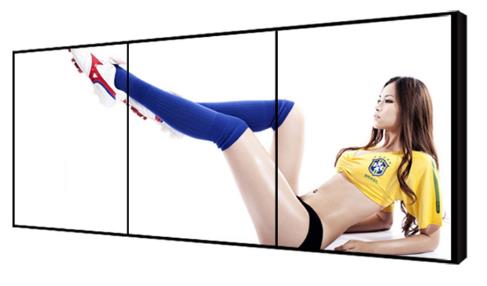
1×3 LCD Video Wall for Retail Wayfinding Systems
Description
Turn Three Horizontal Panels into a Complete Arrival Guide
Shopping centers, flagship stores and commercial corridors often need to show directions, floors, events and brand messages within limited vertical space. A 1×3 LCD video wall for retail wayfinding forms a continuous information ribbon above entrances, escalators, service desks or route intersections, helping visitors identify their destination while they are still moving.
The display does not have to use one panoramic image at all times. In a routine layout, each panel can carry a floor index, arrow or promotion; during a campaign, the three panels can become one wide visual. The same installation can therefore support navigation and brand communication without sacrificing essential directions. The horizontal format also leaves surrounding architectural signs visible instead of creating an unnecessarily tall obstruction.
Organize Information Around the Visitor Journey
Effective guidance starts with the questions a visitor needs answered now: current location, destination, direction of travel and approximate distance. Primary route information should retain a fixed position, while advertising must never cover exits, restrooms, accessible routes or other high-priority guidance.
For properties with several entrances, the 1×3 LCD video wall for retail wayfinding can use a separate playlist for each approach. Morning, weekend, closing-time and event schedules may vary, but area names should remain consistent across the screen, printed signs and site maps. A consistent naming system is especially important when tenants, floor zones or temporary venues change during the year.
Protect Text and Arrows from the Two Bezel Lines
A three-panel row contains two vertical joints. Important words, QR codes, arrow tips and faces should remain inside safe zones rather than crossing a bezel. Templates need visible guides for both single-panel and panoramic compositions so that a later layout change does not reduce clarity.
Type size should be tested at the real viewing distance and walking speed, not only on a desktop monitor. Short phrases, clear icons and strong contrast help moving visitors. Multilingual information can rotate or occupy defined areas instead of crowding every language into one frame. Design approval should include a photograph taken from the normal approach path, not only a close screen capture.
Connect Content Platforms without Losing Publishing Control
Content may come from an existing CMS, scheduling platform or local player. Before deployment, confirm the total canvas, three-output mapping, scheduled publishing, emergency override and offline playback. Publishing authority should be documented so public directions cannot be changed by an unrelated campaign user.
For multi-store projects, headquarters may control brand components while local teams update events and locations. Preview, version history and rollback reduce the risk of an incorrect direction or expired promotion remaining on the 1×3 LCD video wall for retail wayfinding. That governance keeps urgent wayfinding available even when several commercial campaigns are scheduled for the same day.
Plan Installation and Service with the Building
The site survey should cover ceiling or wall structure, power, signal routes, fire services and maintenance access. All three panels must share a level plane because even a small height error becomes obvious across a long horizontal image.
Work in an open retail area should avoid peak traffic and include safe barriers, cable management and cleaning access. A front-service or quickly removable mounting design can shorten aisle closures, while a planned fallback source can preserve basic guidance during local maintenance. The survey should also record nearby doors, sprinklers, lighting fixtures and any access panels that must remain clear.
Commission the Wall with Real Wayfinding Content
Acceptance should use actual floor maps, arrows, multilingual labels, event artwork and emergency notices. Review near and far readability, synchronization, color consistency and continuity across both joints instead of accepting the installation from a generic test pattern.
The team should also simulate a player restart, network interruption and publishing error. The 1×3 LCD video wall for retail wayfinding is ready for handover only when the fallback page, template safe zones, content sizes, daily operation and escalation contacts are documented. A signed test checklist gives property management a repeatable reference for later content and equipment changes.
Prepare the Inputs Needed for an Accurate Proposal
For quotation, provide site photographs, available wall dimensions, viewing distance, daily operating hours, source types, CMS requirements and network conditions. Identify suspended mounting, corner placement, long-distance transmission or integration with an existing signage platform at the design stage.
These details determine the panels, processor, mounting structure, cabling and service scope. Separating equipment, installation and optional integration makes proposals easier to compare and limits unplanned changes during site work. For a 1×3 LCD video wall for retail wayfinding, complete site inputs support a practical scope without unverified assumptions.
Frequently Asked Questions
Can the layout show three independent zones?
Yes. The processor can assign one window to each panel or switch to one image across all three panels.
Can directions change for different entrances?
Yes. Separate players, playlists or CMS rules can serve each entrance, subject to the agreed publishing logic.
Should a QR code span two panels?
No. Keep the complete code inside one safe area and test its physical size at the intended scanning distance.
Will guidance disappear if the network fails?
A player with local caching can continue showing downloaded content; the exact fallback behavior must be confirmed for the selected system.
Inquiry
You must be logged in to post a review.
Related products
-

4×4 LCD Video Wall for Network Operations Centers
A sixteen-panel monitoring canvas for…
-

3×1 Vertical LCD Video Wall for Shopping Malls
Fit a Tall Digital Surface…
-

2×3 LCD Video Wall System for Control Rooms
Six Panels for Continuous Monitoring…
-

2×2 LCD Video Wall System for Meeting Rooms
A Four-Panel Solution for Meetings…
Reviews
There are no reviews yet.