

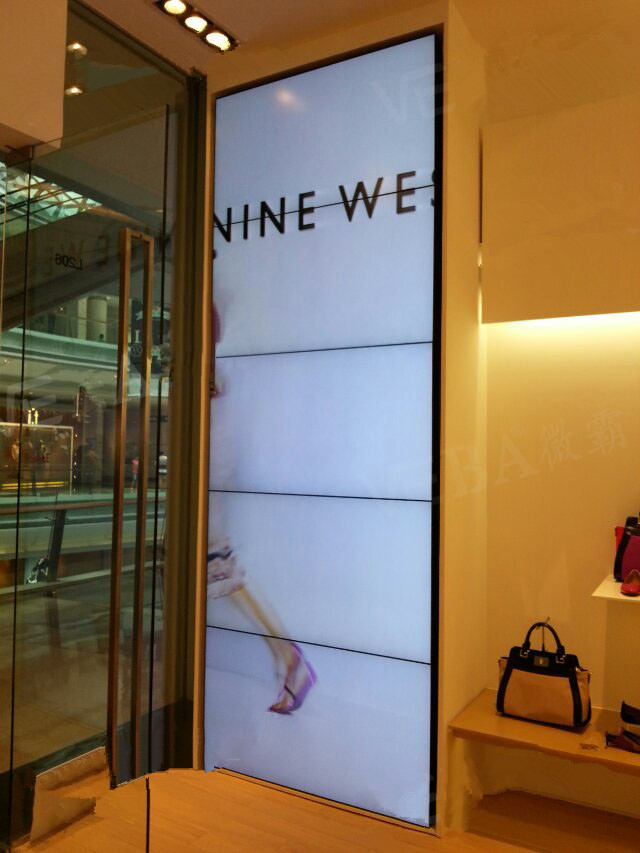
5×1 Vertical LCD Video Wall for Transport Terminals
Description
Present Five Levels of Travel Information on a Narrow Surface
Airports, stations, ports and interchange halls often have columns or tall narrow walls available for public information. A 5×1 vertical LCD video wall for transport terminals uses that height as an information tower for zone identity, service status, directions, notices and commercial content.
The levels should follow the passenger decision path. Zone and direction appear first from a distance, service times become readable on approach, and detailed assistance follows below. Advertising may rotate, but it must never replace disruption, platform, exit or evacuation information. The narrow footprint can make use of architecture that would not accommodate a conventional wide information board.
Create Presets for Routine Service and Disruption
A normal layout can serve floors or travel modes, a peak layout can emphasize transfers and queues, and a disruption layout can present one consistent warning with its update time and source. Presets make priority changes faster than manually rebuilding a tall canvas.
Publishing rights should be separated. Operations staff manage service status, commercial users manage campaign schedules, and safety teams retain the highest emergency priority. This prevents competing departments from overwriting the same display area. A visible confirmation step is valuable before a high-priority notice replaces routine passenger information across all five levels.
Make Multilingual and Accessible Information Easy to Recognize
Passengers may have only seconds to read the screen, so each zone needs limited text and consistent names for terminals, lines and stations. Languages can occupy defined areas or rotate, but translated wording must not squeeze out arrows or times.
Color cannot be the only status cue. Delayed, cancelled and closed states also need words and icons with sufficient contrast. The mounting height and type scale of the 5×1 vertical LCD video wall for transport terminals should remain visible to people of different heights and wheelchair users. Icons should follow the terminal’s existing signage language so passengers do not need to learn a second visual system.
Control Composition Across Four Horizontal Joints
The five-panel column includes four horizontal bezels. Service rows, station names, QR codes and icons belong inside single-panel safe zones. Background images may span the full height, but people, train numbers and time fields should not be divided by a joint.
Test templates with the longest station names, multilingual text and peak service volume. Lock the total canvas, output order and rotation so a player update cannot reverse the sequence or stretch content. A proof image from each main passenger approach helps confirm that the vertical reading order remains intuitive on site.
Plan Structure and Maintenance in a Public Area
Survey structural load, anti-tip protection, fire clearances, power circuits, cooling and service access. Edges and brackets should not project into passenger movement, and installation activities should be coordinated with terminal operating hours.
Maintenance should preserve basic travel information wherever possible. Matching coordinates for panels, cables and backend outputs help duty teams describe faults accurately and reduce investigation time around heavy passenger traffic. Service procedures should also define barriers and safe working times when access equipment enters a passenger circulation area.
Commission with Peak Traffic and Disruption Scenarios
Load real services, transfer directions, multilingual notices and campaign schedules. Review the 5×1 vertical LCD video wall for transport terminals from the entrance, queue and close range for update timing, synchronization, text clarity, color consistency and emergency visibility.
Simulate data loss, a player restart and a disruption preset. An old status must not appear current. Handover documentation should state the source, publishing owner, fallback page and recovery steps for each information type. Operations, commercial and safety representatives should jointly approve the final priority behavior before public use.
Define the Project Scope before Configuration
Provide surface dimensions, site photographs, viewing distance, passenger flow, operating hours, data sources, language count, current CMS and network-security requirements. If service data will update automatically, document the interface and expected refresh cycle.
State who supplies structure, cabling, processor, templates, commissioning and training. A complete scope identifies the system behind the five panels and reduces changes during terminal operation. For a 5×1 vertical LCD video wall for transport terminals, a documented interface scope prevents ambiguous integration responsibility.
Frequently Asked Questions
Can service changes update automatically?
Yes, when the wall is integrated with an authorized timetable or operations interface and the update rules are defined.
Can advertising cover travel information?
Priority and zoning rules should prevent advertising from covering operational or emergency information.
Should multilingual notices scroll?
Short notices may scroll, but directions, times and critical states are usually clearer when fixed.
Can the other panels work while one is serviced?
A preset or bypass design may preserve partial information; the exact behavior depends on the signal and power architecture.
Inquiry
You must be logged in to post a review.
Related products
-
1×6 LCD Video Wall for Transport Operations Centers
Why Transport Information Benefits from…
-

2×1 Vertical LCD Video Wall for Retail Stores
Use Vertical Space for a…
-

4×5 LCD Video Wall for Shopping Center Event Spaces
Build a Flexible Twenty-Panel Canvas…
-

4×1 Vertical LCD Video Wall for Broadcast Studios
Build a Clear Production Hierarchy…
Reviews
There are no reviews yet.