

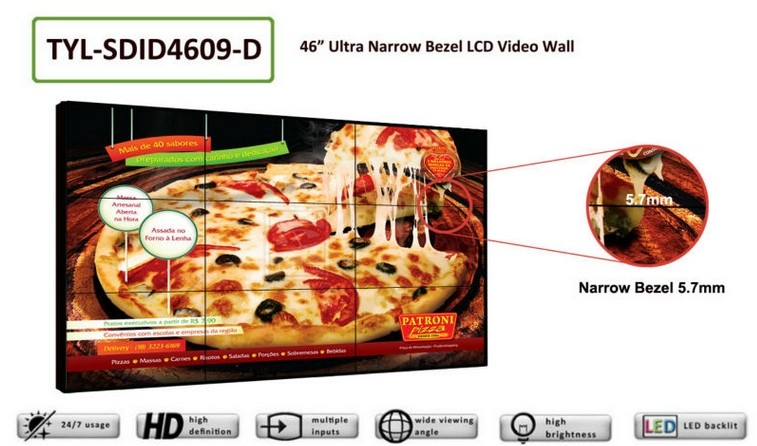
3×3 LCD Video Wall for Industrial Process Monitoring
Description
Build the Wall Around the Production Process
Production teams need to see process relationships, not a collage of isolated dashboards. A 3×3 LCD video wall for industrial process monitoring arranges 9 panels arranged in 3 rows and 3 columns so production supervisors, equipment engineers, EHS staff and maintenance teams can compare equipment status, trends and alarms without repeatedly changing applications.
The working source set contains SCADAprocess graphics, production trends, equipment cameras, quality data, energy reports and safety alarms. Each source should be checked at its native resolution because fine SCADA labels and trend scales can become unreadable after careless enlargement.
Use the Center for the Main Operating Picture
The main process picture belongs in the visual center, while supporting zones can carry quality, energy and maintenance information. The planned arrangement follows a layered layout with the main process in the center, equipment zones on both sides, key indicators above and alarm trends below, giving every shift a predictable place to look.
On a 3×3 LCD video wall for industrial process monitoring, the four-panel center intersection is unsuitable for a permanent alarm value. Place critical numbers inside a panel safe area and let pipes, backgrounds or noncritical graphics cross the joint.
Make Alarms Readable Without Excessive Brightness
Industrial rooms often have controlled lighting but long viewing periods. Set brightness for recognition and fatigue control, then calibrate all nine panels as one surface instead of maximizing each screen independently.
For installation, The central cross-shaped bezel intersection is the most visible part of a 3×3 wall, so installation must control wall flatness, bracket depth and joint consistency across the four central panels. Cable routes should remain separate from maintenance movement, and the final structure must allow one panel to be serviced without disturbing the process display around it.
Choose Information Density for a Long Shift
Industrial dashboards often contain more detail than operators can absorb from a wall. Begin with the actions required during normal production, quality deviation and equipment failure, then remove widgets that do not change a decision.
Use the farthest operator position to test tag names, trend scales and alarm timestamps. If information is unreadable there, enlarging the entire wall is not the only answer; simplify the page and reserve drill-down detail for local workstations.
Coordinate Cleaning and Preventive Maintenance
The maintenance plan should define safe cleaning materials, inspection intervals, ventilation checks and the method used to isolate one panel. Production dust or airborne residue must not be allowed to accumulate around cooling paths.
A scheduled calibration check helps nine panels retain similar brightness and color. Record the baseline after commissioning so later changes can be distinguished from source or lighting problems.
Match Engineering Workstation Resolution to Wall Use
A SCADA workstation designed for a desk monitor may contain small symbols, dense tables and pop-up windows. Test its output on the intended wall zone and decide whether the source application, processor scaling or dashboard layout must change.
Do not enlarge a low-resolution source and assume the panel count creates more detail. The source computer, graphics output and controller input must deliver enough usable pixels for the operating distance.
Protect Service Access in a Dust-Controlled Room
Input counts should reflect SCADA workstations, camera decoders and reporting computers that must appear together. A 3×3 LCD video wall for industrial process monitoring can span one source, preserve fixed zones or open temporary diagnostic windows when the processor supports those modes.
Document the normal shift layout, alarm layout and maintenance layout. Simple names and restricted permissions reduce operating errors when several departments share the room.
Verify the Wall with Shift-Handover Tasks
A useful factory acceptance test is built around a handover between shifts. test readability with trend lines, process diagrams, small labels and flashing alarms, then verify shift handover, alarm enlargement and maintenance modes. Operators should be able to identify a problem, enlarge evidence and return to routine monitoring without technical assistance.
Handover of the 3×3 LCD video wall for industrial process monitoring includes mappings, cable labels, calibration records and cleaning or service guidance suited to the industrial environment.
Information Needed from the Plant Team
The plant team should supply a room plan, operator distances, SCADA workstation resolutions, camera decoder outputs, alarm colors, shift patterns and environmental conditions. Photographs of the wall, cable entry and nearby equipment help identify structural or cooling constraints early.
With those inputs, the 3×3 LCD video wall for industrial process monitoring can be proposed as a complete operating system rather than nine screens alone. The bill of materials may cover panels, brackets, processing, signal paths, power distribution, labels, spares and commissioning.
Frequently Asked Questions
How many panels form a 3×3 video wall?
Nine panels are arranged in three rows and three columns.
Can SCADA and camera video appear together?
Yes, when the controller accepts the required computer and video sources and provides the planned windows.
What should be placed at the center intersection?
Avoid permanent critical text or alarm values at the four-panel intersection; use that area for backgrounds or noncritical graphics.
How should an industrial wall be tested?
Use actual process screens, alarms, trends and cameras during a realistic shift-handover exercise.
Inquiry
You must be logged in to post a review.
Related products
-

1×3 LCD Video Wall for Retail Wayfinding Systems
Turn Three Horizontal Panels into…
-
3×4 LCD Video Wall for Emergency Coordination Rooms
Turn Twelve Screens into an…
-
3×5 Floor Standing LCD Video Wall for Energy Control Rooms
Why a Floor Cabinet Fits…
-
6×4 LCD Video Wall for Traffic Management Centers
Combine Road Networks and Junction…
Reviews
There are no reviews yet.