

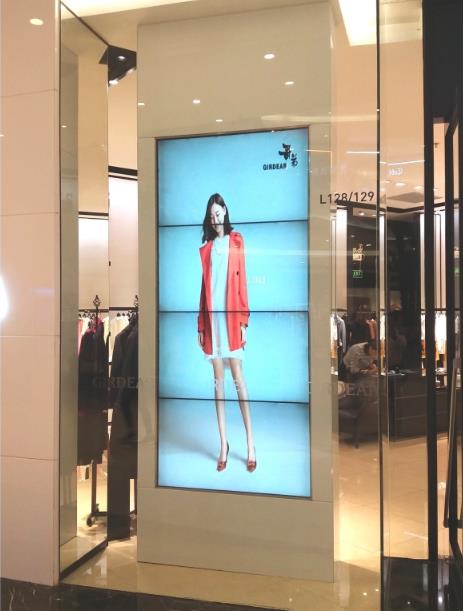
4×1 Vertical LCD Video Wall for Broadcast Studios
Description
Build a Clear Production Hierarchy on Four Stacked Screens
A 4×1 vertical LCD video wall for broadcast studios fits side walls, control-room columns and production areas where horizontal space is limited. Four stacked display zones can carry program output, preview, remote contributors and system status along one concentrated sightline.
The value is not simply four more screens. Program and preview can occupy the most natural eye level, remote returns can sit above them, and timing, intercom or equipment status can remain below. A stable order reduces searching during a live production. This arrangement can supplement the main multiview display without demanding a wide section of the production wall.
Assign Sources and Alarms by Program Workflow
Recording, live news, interviews and multi-site contribution require different monitoring arrangements. Saved presets let the director recall the correct source layout for each production instead of rebuilding windows before every show.
Signal loss, audio faults and remote-link failures need fixed, prominent warnings. Routine device status should not compete with the on-air picture. Names on the 4×1 vertical LCD video wall for broadcast studios should match the switcher, router and intercom labels used by the crew. Preset documentation should identify the default scene that returns after a controlled restart or power restoration.
Keep Timecode, Captions and Audio Meters Readable
Three horizontal bezel lines can cut through captions, timecode or audio meters. A multiview template should keep these details inside individual-panel safe areas and avoid placing faces or essential framing lines across a joint.
Because operators may sit close to the wall, excessive brightness and sharpening can cause fatigue. Calibration should use studio lighting, dark scenes, skin tones, fine text and motion, rather than relying only on a bright demonstration clip. Operators should review both seated and standing sightlines because studio teams may change position throughout a program.
Integrate Production Systems without Changing Familiar Controls
Create a source schedule for program, preview, cameras, return feeds, graphics, conferencing and remote guests. Confirm interfaces, resolutions, frame rates and embedded audio. If a router or multiviewer already exists, define which device performs switching and window composition.
The control page should use familiar production names and restrict changes to critical presets. Remote support may access device health and logs, while content paths and the production network follow the studio’s security policy for the 4×1 vertical LCD video wall for broadcast studios. The boundary between display control and production switching must be clear so neither system duplicates an essential command.
Plan Vertical Structure, Cooling and Service Access
Stacking four panels increases the importance of structural capacity, plumb alignment and secure fixing points. Survey the wall or steelwork, top and bottom clearances, ventilation and the path for removing one display without dismantling the full column.
Label cables by level to prevent an engineer from disconnecting the wrong program path. Near the control room, also assess equipment noise, air-conditioning flow and reflections from task lighting, and keep maintenance work clear of operating aisles. A documented removal path helps the studio schedule service without unexpected structural work near active production equipment.
Validate the Complete Chain during a Program Rehearsal
Commissioning should load real program layouts and test program-to-preview changes, timecode, captions, audio meters, remote feeds and fault indications. The goal is to verify common production modes, not merely confirm that four panels illuminate.
Simulate one lost input, a processor restart and preset recovery, then record the sequence. The 4×1 vertical LCD video wall for broadcast studios should be handed over with scene instructions, naming restrictions, brightness modes, daily checks and an escalation route. Rehearsal results should be approved by the production team as well as the engineer responsible for the display system.
Prepare a Complete Signal Matrix for Quotation
Provide the intended wall position, viewing distance, production format, number and type of sources, current router or multiviewer models, redundancy needs and remote-management requirements. If work must occur within an off-air window, include the permitted schedule and studio controls.
A proposal based on the actual signal matrix and mounting conditions can separate displays, processing, control, cabling, commissioning and training. This makes technical comparisons clearer and prevents hidden interface work during installation. For a 4×1 vertical LCD video wall for broadcast studios, the signal schedule is the foundation of an accurate design.
Frequently Asked Questions
Must the four panels always show four sources?
No. They may show four independent feeds or allow one source to occupy several panels when the processor supports it.
Can the wall show timecode and audio meters?
Yes. These are normally generated by the multiviewer or production system and should be placed away from bezel lines.
Is the vertical layout suitable for close control-room viewing?
It can suit an auxiliary or narrow wall, but panel size and mounting height should be checked against actual operator sightlines.
Can live and recorded shows use separate layouts?
Yes. Multiple protected presets can be stored and recalled through the agreed control interface.
Inquiry
You must be logged in to post a review.
Related products
-
2×1 Vertical LCD Video Wall for Retail Stores
Use Vertical Space for a…
-
6×3 LCD Video Wall for Public Safety Control Rooms
Support Public Safety Duty Teams…
-
3×7 LCD Video Wall for Enterprise Network Operations Centers
Organize the Wall by Business…
-
5×6 LCD Video Wall for Enterprise Operation Centers
Make Thirty Panels Serve Business…
Reviews
There are no reviews yet.