

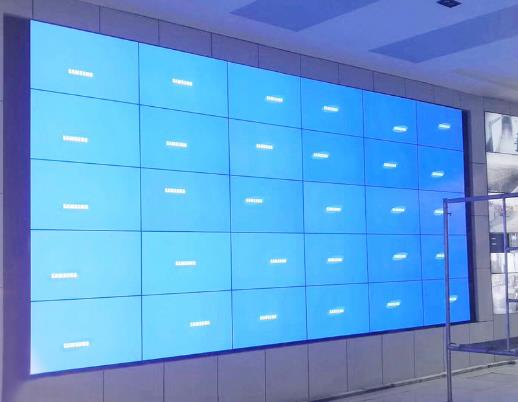
5×6 LCD Video Wall for Enterprise Operation Centers
Description
Make Thirty Panels Serve Business Outcomes
A 5×6 LCD video wall for enterprise operation centers can bring business metrics, IT services, supply chain, security alerts, conferences and major projects into one shared environment. Layout planning should begin with decisions and responsibilities, not with the goal of filling every panel.
Use the center for the highest-impact event, place trends and dependencies at the sides, and retain long-term health indicators at the edge. This hierarchy helps leaders understand impact while operational teams see the actions that require attention. The shared wall should summarize enterprise health while specialists continue detailed diagnosis on their individual tools.
Change Operating Views with Escalation Level
Routine mode tracks trends and service health, peak mode highlights capacity and transactions, and major-incident mode concentrates on impact, ownership, recovery and communication. Presets aligned with the enterprise incident scale reduce setup time during escalation.
Assign an owner and refresh expectation to each source. Automated feeds show continuing state, while human confirmation records impact and decisions. The two should be visually distinct so preliminary data is not treated as a final conclusion. A documented escalation trigger prevents routine fluctuations from repeatedly switching the room into a major-incident layout.
Create a Visual Hierarchy for a Wide Room
Six columns produce a wide field of view, so rear consoles cannot rely on small tables. Titles, states and major trends should remain legible at distance, while detailed logs stay on personal workstations. Safe zones protect numbers, decimals, alert codes and timestamps from bezels.
Normalize dashboard colors into a limited set of states. Reserve red for issues that require action and use text or icons in addition to color. A 5×6 LCD video wall for enterprise operation centers should make priority clearer, not amplify every minor change. Viewing tests should include the outermost desks because edge content can be difficult to interpret from an acute angle.
Govern Sensitive Data and Cross-Team Collaboration
Operations centers may display customer, financial, employee and security information. Role-based access should limit source visibility, remote control and recording. A visitor or executive-meeting scene can mask sensitive details without rebuilding the layout.
Business, IT, security and facilities teams should share event IDs, time standards and ownership fields. Consistent references allow the same issue to be traced from wall to ticket to meeting notes without ambiguous verbal descriptions. Temporary external participants should receive only the sources and controls required for the specific collaboration session.
Plan for Expansion and Maintenance without Full Shutdown
Divide racks, power, cooling and signal paths into serviceable zones and reserve capacity for known future sources. Backup choices should follow critical workflows and may include alternate inputs, a standby control node or a validated fallback page.
Document maintenance windows, spares and upgrade steps. Test software changes outside a critical scene, identify panels and cables by location, and verify source timestamps and presets after work is complete. Capacity records should state used and reserved inputs so future additions can be planned without guesswork.
Commission through a Real Enterprise Incident
Simulate a service outage or supply-chain interruption from detection through impact assessment, collaboration and closure. Test data refresh, preset recall, conferencing, permissions, timestamps and readability from each operating position.
Loss of one source and restart of a control device should also be tested. Handover of the 5×6 LCD video wall for enterprise operation centers should include the topology, scene register, access matrix and escalation path. The exercise should confirm who declares recovery and who authorizes the return from incident mode to normal operations.
Build the Proposal from Business and Technical Inventories
Provide room and console drawings, viewing distances, connected business platforms, signal counts and formats, conferencing, operating hours and security requirements. Identify expected future sources so expansion capacity can be evaluated.
The resulting proposal can distinguish the core wall, processing, control, redundancy, structure, cabling and site services from optional growth. This lets stakeholders prioritize investment against business continuity. For a 5×6 LCD video wall for enterprise operation centers, business priorities should remain visible in every proposal option.
Frequently Asked Questions
How many business platforms can the wall show?
Capacity depends on processor inputs and layouts, so plan from decision priorities rather than assuming one system per panel.
Can sensitive data be hidden for a visitor meeting?
Yes. A protected visitor scene can use masked sources and restricted recall permissions.
Can a conference share the wall with dashboards?
Yes. The layout may use a conference zone alongside operational data after video and audio paths are confirmed.
Will adding a source require replacement of the full system?
Not necessarily. Reserved input and processing capacity may allow expansion, subject to the installed architecture.
Inquiry
You must be logged in to post a review.
Related products
-
3×9 LCD Video Wall for Executive Briefing Centers
Create a Shared Evidence Wall…
-

4×1 Vertical LCD Video Wall for Broadcast Studios
Build a Clear Production Hierarchy…
-

3×4 LCD Video Wall for Emergency Coordination Rooms
Turn Twelve Screens into an…
-
3×5 Floor Standing LCD Video Wall for Energy Control Rooms
Why a Floor Cabinet Fits…
Reviews
There are no reviews yet.