

3×6 LCD Video Wall for Corporate Experience Centers
Description
Make the Display Part of the Visitor Journey
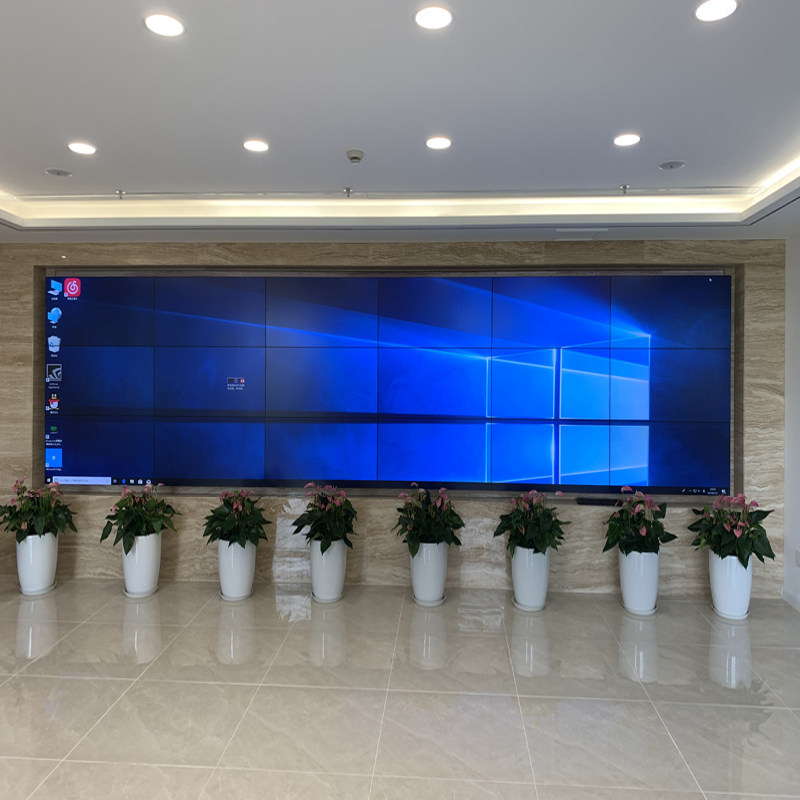
A corporate experience center needs a narrative surface rather than a dense monitoring board. The 3×6 LCD video wall for corporate experience centers turns 18 panels arranged in 3 rows and 6 columns into a panoramic stage for reception staff, marketing teams, presenters and key-account demonstration teams as visitors move from introduction to proof and discussion.
Content sources may include brand films, project case studies, live business data, interactive presentation computers, event streams and multilingual welcome pages. Their purpose is different from an operations room: transitions, timing and visual continuity carry as much weight as the number of simultaneous windows.
Design Native Content for an Eighteen-Screen Canvas
The presentation plan uses full-screen welcomes, brand timelines, product matrices, project maps and executive presentations use different visual rhythms instead of simply stretching standard 16:9 media. Artwork should be authored for the complete canvas instead of stretching ordinary video across eighteen screens.
When a 3×6 LCD video wall for corporate experience centers combines film and live data, product names, faces and calls to action should remain inside panel-safe areas. Panoramic backgrounds can cross the bezels and visually connect the story.
Connect Live Business Data Without Losing the Story
The wall is part of the architecture. The product images show a lobby setting, so visitor flow, ambient light, wall finishes, audio, concealed cabling and front-service requirements should be designed together. Lighting, sound, ventilation and panel service movement need coordination with the interior contractor before decorative finishes close the opening.
Hide cables without making them unreachable. A clean visitor-facing surface still needs labeled signal paths and a practical way to remove a center panel without damaging adjacent trim.
Create Content Safe Areas for the Physical Bezel Pattern
The creative agency needs an overlay showing all panel joints, not only the total pixel canvas. Place faces, product names and small captions inside safe areas while allowing texture, landscape and motion to cross the grid.
Review the artwork on the physical wall before final release. Desktop previews cannot reproduce bezel interruption, room scale or the way visitors approach from the side.
Plan an Update Workflow for Nontechnical Hosts
Experience-center staff should be able to choose approved scenes and update scheduled media without opening processor configuration. Separate daily content tasks from engineering access.
A preview and approval step prevents an incorrectly sized file from reaching an important customer visit. Keep a known welcome scene locally available if the network content source is temporarily unavailable.
Coordinate Sound, Timing and Visitor Dwell
A panoramic film may use sound, but continuous high volume can conflict with reception and nearby meeting areas. Define speaker coverage, maximum levels and silent fallback content with the interior and operations teams.
Measure how long visitors actually remain at each position. Short entrance messages and deeper demonstration scenes should not be forced into one loop with the same pace.
Coordinate the Wall with Lighting and Interior Finishes
A 3×6 LCD video wall for corporate experience centers may switch among a full-width brand film, a product matrix, a project map and a management presentation. The processor should support these approved scenes without exposing complex controls to daily hosts.
Provide the content team with canvas dimensions, safe areas, accepted resolutions and a simple naming method. That prevents last-minute material from appearing cropped or stretched during an important visit.
Accept the Experience from More Than One Viewpoint
Acceptance follows the visitor route. check image continuity, color consistency, caption size, reflections and presenter access to presets from the entrance, central presentation area and side passage. A display that looks correct only from the central technician position is not ready for an experience center.
The 3×6 LCD video wall for corporate experience centers passes when the story remains coherent, colors stay consistent, subtitles are readable and hosts can change scenes confidently while maintenance access remains available.
Turn the Creative Brief into Technical Requirements
The creative brief should identify visitor types, languages, journey length, key stories, live-data sources, audio requirements and event modes. The technical survey adds wall dimensions, ambient light, control location, network access and service direction.
Combining both briefs prevents the 3×6 LCD video wall for corporate experience centers from becoming visually impressive but difficult to update. The final proposal can include canvas guides, approved presets, player or controller functions, installation structure and content testing.
Frequently Asked Questions
How many panels create the 3×6 canvas?
Eighteen panels are installed in three rows and six columns.
Can ordinary 16:9 video fill the wall?
It can be scaled, but content produced for the total canvas ratio avoids distortion and uses the panoramic area more effectively.
Can live dashboards appear beside brand video?
Yes, when the controller supports independent windows and the data source resolution is planned in advance.
What should be checked from the side walkway?
Review viewing angle, reflections, brightness balance, text legibility and whether bezel positions interfere with important content.
Inquiry
You must be logged in to post a review.
Related products
-
2×4 LCD Video Wall System for Surveillance Centers
Eight Panels for a Clear…
-
2×1 Vertical LCD Video Wall for Retail Stores
Use Vertical Space for a…
-
3×9 LCD Video Wall for Executive Briefing Centers
Create a Shared Evidence Wall…
-
1×4 LCD Video Wall for Digital Showrooms
Create a Continuous Digital Feature…
Reviews
There are no reviews yet.