

3×9 LCD Video Wall for Executive Briefing Centers
Description
Create a Shared Evidence Wall for Decisions
Executive discussions improve when evidence remains visible beside the main presentation. A 3×9 LCD video wall for executive briefing centers provides 27 panels arranged in 3 rows and 9 columns for executives, project leaders, data-analysis teams and remote participants, supporting comparison without shrinking every chart onto one screen.
The room may combine management dashboards, regional maps, project portfolios, video conferences, presentation computers, live data and feature films. Source switching, audio-video timing and data resolution should be agreed with the conferencing and presentation systems before commissioning.
Move Between Briefing and Collaboration Modes
Different meetings require different visual emphasis. The design supports meeting mode emphasizes the presentation and remote participants, decision mode retains core metrics and comparisons, and launch mode switches to panoramic brand content, letting the host move from presentation to comparison or remote collaboration without rebuilding twenty-seven outputs.
A 3×9 LCD video wall for executive briefing centers needs disciplined content placement. Keep names, financial figures and speaker faces away from bezel lines; reserve panoramic areas for maps, backgrounds and broad trends.
Coordinate the Wall with Cameras and Room Audio
Remote participants need a camera angle that makes the briefing room feel natural, while local attendees need clear audio without facing away from the display. Camera, microphone and loudspeaker positions should be designed with the wall elevation.
Test the room with a presenter standing, executives seated and a remote speaker sharing content. The layout should not force participant video to cover the evidence being discussed.
Protect Confidential Material During Source Changes
Executive walls may handle commercial or operational information that should not appear during an external visit. Source names, preview behavior and blanking controls must support a deliberate transition between confidential and public modes.
A neutral fallback screen is safer than exposing the last active source after a reconnect. User permissions and operating instructions should reflect the organization’s confidentiality policy.
Prepare a Host Checklist for High-Level Meetings
Before each meeting, the host can confirm the starting preset, remote connection, guest input, audio, lighting and fallback source. This short routine reduces troubleshooting in front of participants.
After the meeting, disconnect guest devices and return the room to a known state. The checklist should identify who to call if a source or panel does not behave as expected.
Protect Sightlines Around a Large Meeting Table
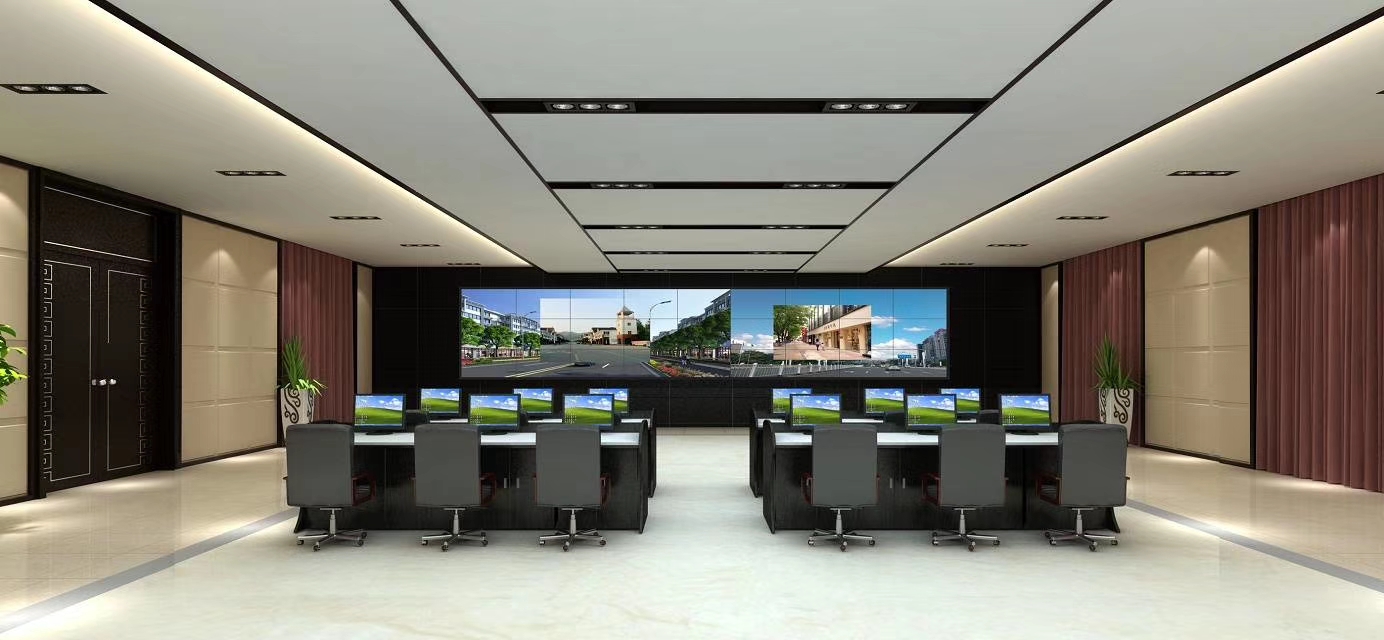
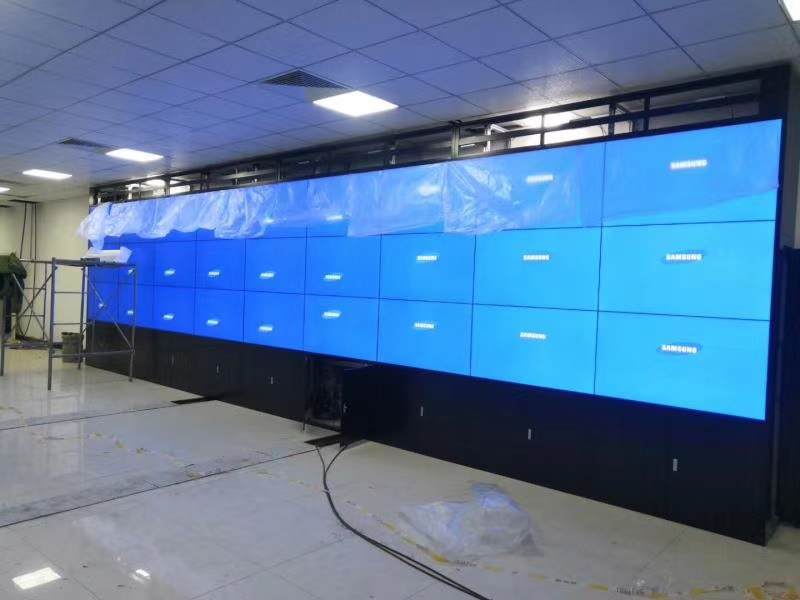
Sightlines determine whether the lower row is useful. The product gallery shows a meeting-room application, so sightlines should be checked from the head seat, side seats and rear row to prevent the table from blocking the lower screens and to control lighting reflections. The main seat, side seats and rear seats should all be included on the elevation drawing.
Room lighting needs meeting and presentation scenes that do not create reflections. Panel brightness and white balance are calibrated for people viewing charts for an extended session.
Handle Data, Video and Remote Participants Together
Processing should accept the normal executive computer, remote meeting system and data sources with simple presets. The 3×9 LCD video wall for executive briefing centers does not need every technical feature if hosts cannot operate it reliably.
Define who controls the wall, how a guest laptop connects and what happens when a source disconnects. A known fallback prevents a blank canvas during a high-level briefing.
Test the Room with Real Executive Content
Test with actual executive material: use real charts, small-text tables, video-conference participants, cross-screen maps and panoramic films to test all 27 outputs, synchronization, audiovisual latency and preset switching. Small tables and participant video reveal different weaknesses from a full-wall promotional clip.
Acceptance of the 3×9 LCD video wall for executive briefing centers includes seated visibility, synchronization, mapping, preset response, service access and a concise host guide for the room team.
Briefing-Room Details to Confirm Before Production
The briefing-room survey should capture seating, principal sightline, table height, camera and speaker locations, room-lighting scenes, presentation devices, conferencing outputs and the smallest charts normally reviewed. Identify guest connection requirements separately.
A complete 3×9 LCD video wall for executive briefing centers proposal can then coordinate display, controller, mounting, signal routing and room integration. Testing with representative executive files should be included before shipment and repeated during site acceptance. The host team should approve the control sequence and fallback screen before the room enters regular use.
Frequently Asked Questions
How many panels are in the wall?
A 3×9 layout contains twenty-seven panels arranged in three rows and nine columns.
Can the wall show a video conference and dashboards together?
Yes, if the conferencing output and data sources are included in the controller design and saved layouts.
How is the lower row kept visible?
Set the installation height and table position from seated sightlines, then test the view with people in the front seats.
What content reveals alignment problems?
Wide maps, straight grid lines, tables and slow horizontal motion make mapping and panel alignment errors easy to see.


Inquiry
You must be logged in to post a review.
Related products
-
1×4 LCD Video Wall for Digital Showrooms
Create a Continuous Digital Feature…
-

5×4 LCD Video Wall for Event Production Centers
A twenty-panel production display for…
-
2×1 Vertical LCD Video Wall for Retail Stores
Use Vertical Space for a…
-
5×6 LCD Video Wall for Enterprise Operation Centers
Make Thirty Panels Serve Business…
Reviews
There are no reviews yet.