

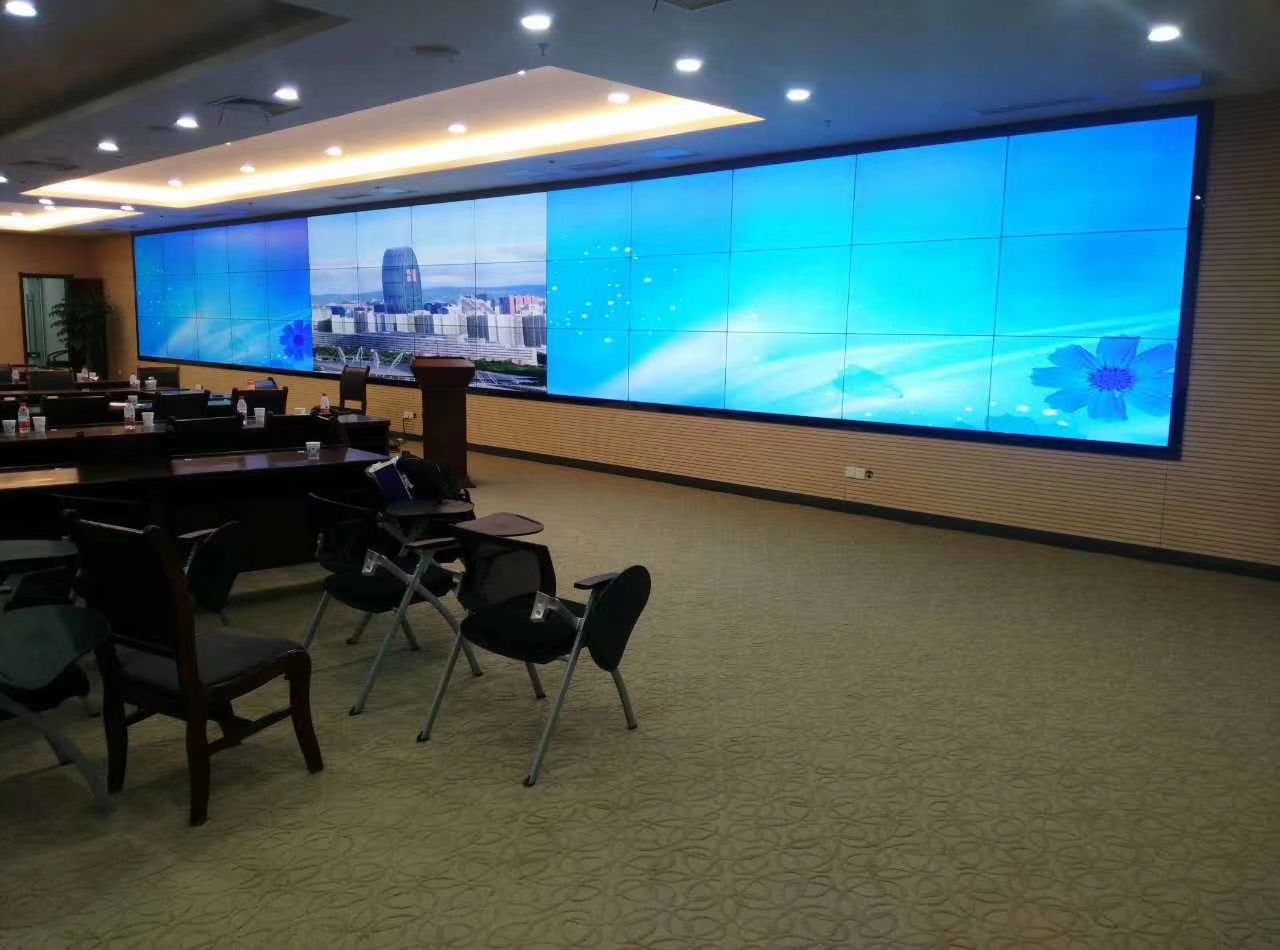
3×14 LCD Video Wall for Airport Operations Centers
Description
Forty-Two Panels for a Shared Airport Picture
With 42 panels arranged in 3 rows and 14 columns, a 3×14 LCD video wall for airport operations centers can place flight movements, terminal conditions and response information in one continuous field of view. flight operations, security, baggage, facilities and duty-management teams gain a common reference instead of interpreting separate desktop screens during a fast-changing event.
The source schedule should identify flight information systems, surveillance video, baggage-handling status, access-control alarms, weather data and emergency communications. Airport systems refresh at different rates, so resolution, latency, ownership and the number of simultaneous windows must be confirmed before processing hardware is selected.
Separate Daily Operations from Disruption Mode
Routine traffic does not use the wall in the same way as weather disruption or a security event. The operating concept therefore includes four preset layouts for routine flight operations, severe weather, security incidents and joint briefings, with each preset protecting the information that must remain visible while temporary sources expand.
A 3×14 LCD video wall for airport operations centers should preserve a clear hierarchy from the main console and the supporting desks. Flight identifiers, warning colors and map labels need safe positions away from long bezel intersections.
Plan the Viewing Geometry Before Choosing Panel Size
A forty-two-panel airport wall can become too wide for operators seated close to the center. Plot the leftmost and rightmost sightlines from each console, then compare 46, 49, 55 and 65 inch options against readable flight text rather than selecting size from total wall impact alone.
A gentle change in console distance may improve edge viewing more than increasing brightness. The room drawing should also show columns, doors, ceiling services and emergency routes so the complete display does not interfere with staff movement.
Segment Power and Maintenance by Operating Zone
Airport operations cannot lose the complete picture because one power branch or one local service task is unavailable. Divide the wall and processing equipment into documented zones, coordinate them with UPS capacity, and make the recovery sequence visible to the duty engineer.
Critical spares should follow the agreed risk plan. A spare panel, receiving card, power component or signal extender is useful only when its location, compatibility and replacement procedure are recorded before an incident.
Keep Flight Information Legible Across the Bezel Grid
Flight tables, gate numbers and time columns should be designed with safe margins around every vertical and horizontal joint. A test file using the actual airline fonts and status colors is more valuable than a generic 4K sample during factory acceptance.
Maps and surveillance video can tolerate some bezel interruption, but aircraft identifiers and warning states cannot. Content templates should therefore be approved by both the airport operations team and the display integrator.
Control Alignment Across Fourteen Columns
Fourteen columns amplify a small structural error. The extra-wide structure requires a centerline and reference points at both ends, zone-by-zone installation and calibration, plus either a rear service aisle or a front-service mounting design. Survey data and bracket adjustments should be recorded zone by zone rather than corrected only after all forty-two panels are installed.
Power circuits, processor outputs and physical screen positions need one numbering convention. That record helps an airport technician isolate a local signal issue without interrupting unrelated terminal information.
Design Processing Around Airport Systems
Controller sizing begins with operational scenarios, not with forty-two assumed inputs. The 3×14 LCD video wall for airport operations centers may combine a shared airport map, fixed flight lists and temporary camera windows, each with different scaling and permission requirements.
Define who may recall disruption presets, who may add a source and which layout returns after a restart. Those decisions prevent an accidental whole-wall change during joint operations.
Acceptance During a Realistic Operating Drill
Commissioning should follow an airport exercise: use real flight lists, alarm colors, maps, camera feeds and cross-zone windows to verify all 42 outputs, preset switching, power-loss recovery and extended operation. Controllers, panels and operators are evaluated together while the room is using realistic content.
Final approval of the 3×14 LCD video wall for airport operations centers also covers end-panel readability, color matching, preset recall, recovery instructions and safe access to the central and outer display zones.
Prepare an Airport-Specific Proposal Package
For an accurate airport proposal, provide the control-room drawing, console positions, farthest viewing distance, flight and security source schedule, number of simultaneous windows, preferred service direction and daily operating hours. These items determine panel size, controller architecture, mounting depth and cable planning.
The quotation for the 3×14 LCD video wall for airport operations centers can then separate panels, structure, processing, signal extension, power accessories, spare parts, factory testing and site services. A defined scope makes bids comparable and reduces interface disputes during installation.
Frequently Asked Questions
How many panels are used in this layout?
A 3×14 configuration contains forty-two panels arranged in three rows and fourteen columns.
Why are presets important in an airport control room?
Presets let teams move quickly between routine flights, weather disruption, security response and joint briefing layouts.
How is alignment controlled across fourteen columns?
Installers establish common structural references, align the wall by zones and verify the two ends against the center.
What information is needed for a proposal?
Provide room drawings, viewing positions, source lists, simultaneous windows, operating modes, service access and daily running hours.
Inquiry
You must be logged in to post a review.
Related products
-

5×4 LCD Video Wall for Event Production Centers
A twenty-panel production display for…
-

2×4 LCD Video Wall System for Surveillance Centers
Eight Panels for a Clear…
-

2×2 LCD Video Wall System for Meeting Rooms
A Four-Panel Solution for Meetings…
-

4×4 LCD Video Wall for Network Operations Centers
A sixteen-panel monitoring canvas for…
Reviews
There are no reviews yet.